How to Tell If a Website Is Safe Before You Enter Your Details
Whether you’re buying something online, paying a bill, or signing up for a service, there’s always a moment where you’re asked to enter your card details, email, or personal information. Before you do, it’s worth taking a few seconds to check if the website actually deserves your trust.
1. Check for “https” and the Padlock Icon
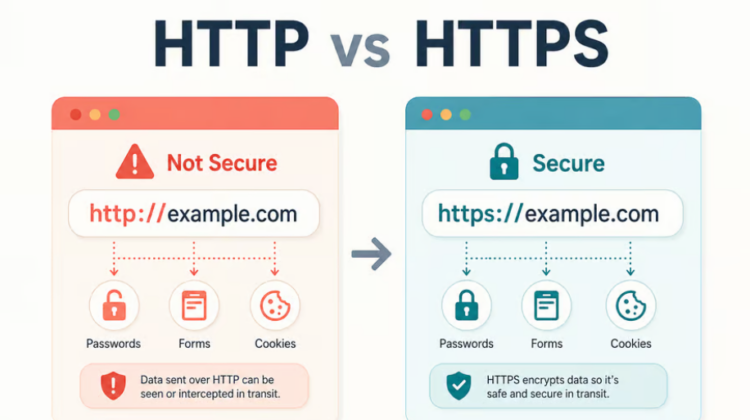
Look at the website address bar. A secure website will start with “https://” (not just “http://”) and usually shows a small padlock icon next to the address. This means the connection between you and the website is encrypted, harder for anyone to intercept your information as it travels.
Important note: https alone doesn’t guarantee a site is legitimate, scam sites can have it too, but its absence is a clear red flag. Never enter payment or personal details on a site without it.
2. Look Closely at the Actual Web Address
Scammers often create website addresses that look almost identical to real ones, with small changes you might not notice at a glance, an extra letter, a different ending, or a completely unrelated domain pretending to be a familiar brand.
What to do: Read the full web address carefully before entering anything. If you got there through a link in an email, message, or ad, be extra cautious, type the website address directly into your browser instead when in doubt.
3. Check for Real Contact Information
Legitimate businesses usually have a real, verifiable way to contact them, a physical address, a working phone number, an email that matches their domain. If a website has no contact details at all, or only a contact form with no other way to reach them, that’s worth pausing over.
4. Search for Reviews Outside the Website Itself
Don’t just trust testimonials on the website, anyone can write those. Search the business name separately on Google, along with words like “review” or “scam,” and see what comes up from independent sources.
5. Be Wary of Deals That Feel Too Good
If a website is offering something at a price that seems unrealistically low, a brand new phone at half the normal price, for example, that’s often designed to get you to act quickly without thinking it through. Genuine businesses rarely need to undercut the market that dramatically.
6. Check How They Ask for Payment
Be cautious of websites that only accept direct bank transfers with no other payment option, especially for larger purchases. Legitimate online stores typically offer card payment or a recognized payment gateway, which usually comes with some level of buyer protection.
7. Trust Your Instincts, Then Verify
If something about a website feels off, poor grammar, low-quality images, pressure to act immediately, trust that instinct enough to slow down and verify before entering any details. A few extra minutes of checking is far cheaper than recovering from a scam.
When In Doubt, Don’t Enter Your Details
If you’ve gone through these checks and you’re still unsure, the safest choice is simply not to proceed. A legitimate business will still be there tomorrow. A scam site is counting on you acting before you think.
If you want help checking whether your own business website meets proper security standards, or if you’ve been targeted by a suspicious site and aren’t sure what to do next, that’s exactly what we help with at Webiit Technologies. Reach out to us if you need a second opinion.